Nameservers explained
Nameservers are the servers that hold your domain's DNS records and answer questions about them, such as "what is the IP address of example.com?". This guide explains how nameservers relate to the company where you registered your domain, how to see which ones a domain uses, and how to decide whether to change them or simply edit a record.
What nameservers do
When someone visits your website or sends you an email, their device asks DNS where to go. DNS follows a chain: the root servers point to the servers for the extension (for example .com), and those point to your domain's nameservers. Your nameservers then give the final answer from your DNS records, also called your DNS zone.
A domain usually has two or more nameservers, such as ns1.example.net and ns2.example.net. They hold the same records, so if one is unreachable the other still answers.
Registrar and DNS host are separate roles
Two different jobs are involved in running a domain, and they are often confused:
| Role | What it does | Where you change it |
|---|---|---|
| Registrar | Registers the domain for you and sends your settings to the registry that runs the extension | Your account with the company you registered the domain with |
| DNS host | Runs the nameservers that store and answer your DNS records | Your account with whichever provider runs those nameservers |
The same company can do both, but it does not have to. For example, you can register a domain with one company and point its nameservers to your hosting provider or to a separate DNS service. The nameserver setting at your registrar decides which DNS host is in charge.
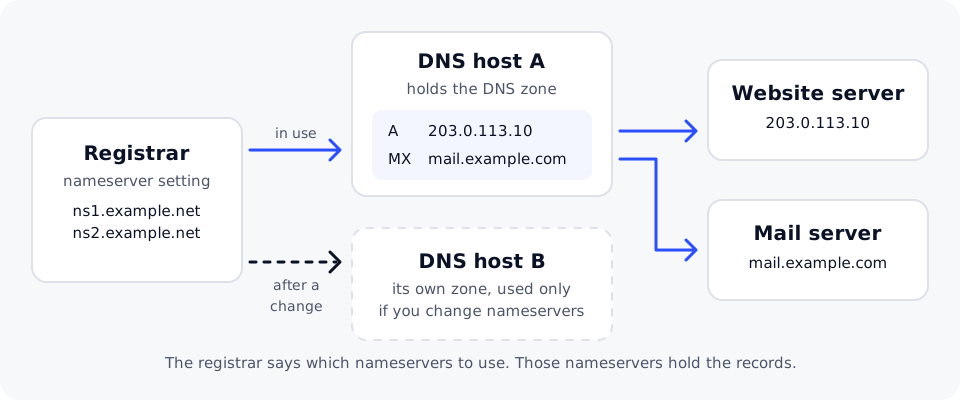
Find a domain's current nameservers
Before you edit any records, check which nameservers the domain uses. Only the provider that runs those nameservers can change your live DNS.
On macOS or Linux, open Terminal:
dig +short example.com NS
On Windows, open Command Prompt or PowerShell:
nslookup -type=ns example.com
The answer lists the nameserver names, for example:
ns1.example.net.
ns2.example.net.
The names usually show which provider runs your DNS. If you do not recognize them, look at the nameserver settings in the account where the domain is registered.
Change nameservers or edit records?
You rarely need to change nameservers to connect a website. Most changes only need a record edit.
Edit records when you want to point the website, www, a subdomain or email to a new service and you are happy with your current DNS host. Everything you do not touch keeps working.
Change nameservers when you want a different provider to manage all of your DNS, for example because your website and email are moving to one host that asks you to use its nameservers, or because you want a DNS service with features your current host lacks.
Connect a domain to a website compares the two methods side by side.
What happens to your records when you switch
Your records are stored at the DNS host, not at the registrar. When you change the nameservers, the internet stops asking the old DNS host and starts asking the new one. The new DNS host only knows the records you add there.
Copy every record you still need to the new DNS host first, especially MX and TXT records for email and any records for subdomains. Records left only at the old host stop working once the change takes effect, and email can bounce.
- Make a full copy of your current records. Many DNS editors can export the zone; otherwise copy each record by hand.
- Add the same records at the new DNS host.
- Compare the two sets carefully, including the
wwwrecord and any verification TXT records. - Change the nameservers at your registrar to the ones the new provider gave you, exactly as written.
- Check the result with
dig +short example.com NSornslookup -type=ns example.com.
The registry usually accepts a nameserver change quickly, but networks may keep using the old nameservers for up to a day or two because of caching. Keep the old records in place until the change has fully taken effect. Why DNS changes take time explains why.
Custom nameservers and glue records
Some businesses, such as web designers who host sites for clients, want nameservers under their own domain, for example ns1.example.com. Because those names sit inside the domain they serve, the registry needs to know their IP addresses directly. These addresses are called glue records, and you register them at the registrar of the domain the nameservers belong to. See Set up custom nameservers for the full process.
DNS management is included with no extra fees for every domain registered with DomainPilot.
Related guides
- DNS records explained
- Connect a domain to a website
- Why DNS changes take time
- Set up custom nameservers