Domains, hosting and websites explained
A website needs three things working together: a domain name people can type, DNS to point that name at the right place, and hosting to store the site and send it to visitors. This guide explains each one and how they connect.
The short version
- Domain name: the address, such as
example.com. You register it for a period of time, usually one year, and renew it to keep it. - DNS (Domain Name System): the internet's directory. It turns a name into the numeric address of a server.
- Web hosting: a server, always connected to the internet, that stores your website's files and sends them to visitors.
- Email hosting: the servers that receive, store and send email for addresses like
hello@example.com.
These can come from one company or from several. A domain registered in one place can point to a website hosted somewhere else and email handled by a third provider.
What happens when someone visits your website
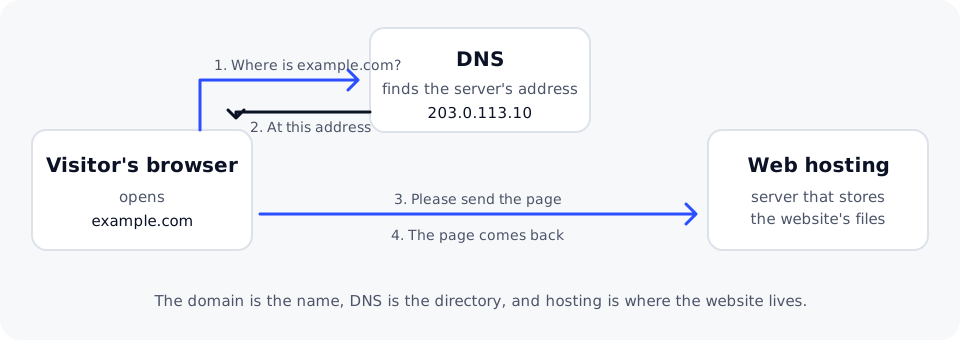
- A visitor types
example.cominto their browser. - The browser asks DNS for the address of
example.com. DNS answers with the IP address of the server, for example203.0.113.10. - The browser connects to that server and asks for the page. With HTTPS, the connection is encrypted and the server proves its identity with an SSL certificate.
- The hosting server sends the page, and the browser displays it.
All of this usually takes well under a second. When one step fails, the website does not load, which is why troubleshooting a website that won't load starts by checking each step in turn.
Domain names
A domain name has two main parts, read from right to left:
- The top-level domain (TLD), or extension, such as
.com,.orgor.io. - The second-level name you choose, such as
exampleinexample.com.
Anything to the left of that is a subdomain, such as www.example.com or shop.example.com. You do not register subdomains separately: once you have the domain, you can create as many as you need in its DNS.
Each extension is run by a registry. You register a name through a registrar, which records you as the holder with the registry. As long as you renew it, the name stays yours to use. If a registration expires, the name can eventually become available for someone else to register, so it is worth keeping renewals on time and your contact email up to date.
DNS
DNS stores records for your domain. Each record answers one kind of question, for example:
- An A record says which server hosts the website.
- An MX record says which servers receive email for the domain.
- A TXT record holds text that other services check, for example to confirm you own the domain or to protect your email.
The servers that hold these records for your domain are its nameservers. Whoever runs your nameservers is where you edit your DNS records. DNS records explained covers each record type in detail.
Web hosting
Hosting is where your website actually lives. The main kinds are:
- Shared web hosting: your site shares a server with other sites, and the provider looks after the server for you. It is the simplest and most affordable way to run a website.
- VPS (virtual private server): a virtual machine with its own guaranteed share of processor power and memory, where you control the operating system.
- Cloud server: a virtual machine you can create, resize and remove on demand, often billed by usage.
Web hosting, VPS or cloud server? helps you choose.
Email
Email for your domain is a separate service from your website, even when the same provider offers both. Your domain's MX records decide where incoming email goes. Changing where your website is hosted does not have to change your email, as long as those records stay the same.
What you need to get started
| You want to | You need |
|---|---|
| Reserve a name for later | A domain name |
| Run a website | A domain name, DNS pointing at your hosting, and hosting |
| Use email at your own domain | A domain name, email hosting and its DNS records |
| Keep visitors' connections private | An SSL certificate on your hosting |
Every domain registered with DomainPilot includes DNS management, free WHOIS privacy protection, a domain lock against unauthorized transfers and email forwarding. See domains, web hosting and business email on the DomainPilot website for plans and prices.