Set up custom nameservers
Custom nameservers let your hosting clients use nameservers named after your business, such as ns1.example.com and ns2.example.com, instead of your host's own names. They are also called private, vanity or branded nameservers. This guide explains how they work and walks through the setup, for resellers and anyone else who wants DNS to carry their own brand.
How custom nameservers work
A nameserver is a server that answers DNS questions for a domain, such as "what is the address of www.example.net?". Every domain lists at least two nameservers at its registry. See Nameservers explained for the basics.
Custom nameservers do not create new servers. They are new names that point to your host's existing DNS servers. When a client domain such as example.net uses ns1.example.com, the answers still come from your host's servers; only the name is yours.
There is one catch. To reach ns1.example.com, a resolver must first know its IP address, but that address is stored in the DNS of example.com, which is answered by ns1.example.com itself. Glue records break that loop: they store the nameserver's IP address at the registry, alongside the domain, so resolvers can find it directly. Some registrars call them host records, child nameservers or registered nameservers.
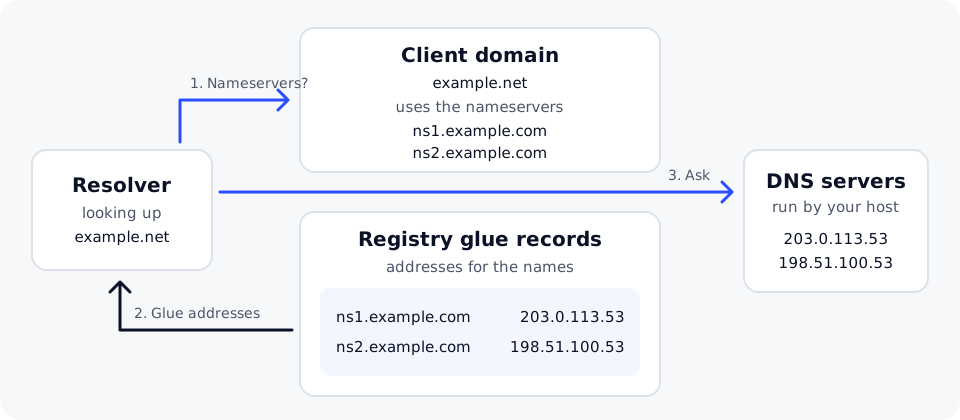
Step 1: register the glue records
Glue records are created at the registrar of the domain you use for the names, not in its DNS zone.
- Sign in to the account where
example.comis registered. - Find the section for host records, child nameservers or registering nameservers. The name varies between registrars.
- Create
ns1.example.comwith the first IP address your host gave you, for example203.0.113.53. - Create
ns2.example.comwith the second IP address, for example198.51.100.53. - Save. The registrar passes the records to the registry, which usually takes minutes.
Step 2: add A records in the zone
The glue records tell the registry where your nameservers are. Your own DNS zone for example.com should say the same thing, so that anyone looking up the names directly gets a matching answer.
In the DNS editor for example.com, add an A record for each nameserver with the same addresses:
ns1.example.com.    3600    IN    A    203.0.113.53
ns2.example.com.    3600    IN    A    198.51.100.53
If your host also gave you IPv6 addresses, add matching AAAA records and IPv6 glue records. Keep the glue and the A records identical: if they differ, some resolvers use one and some the other.
Step 3: point client domains at them
For each client domain, change its nameservers at its registrar to your custom names:
ns1.example.com
ns2.example.com
Before switching a domain that is already live, make sure its DNS zone, including MX and TXT records for email, exists on your host's servers. Otherwise the domain stops resolving or email stops arriving. Connect a domain to a website covers the switch in detail.
Step 4: check that it works
On macOS or Linux, open Terminal. On Windows, nslookup gives similar answers.
# The nameserver names resolve to the right addresses
dig +short ns1.example.com A
dig +short ns2.example.com A

# A client domain lists your nameservers
dig +short example.net NS

# Your nameservers answer for the client domain
dig @ns1.example.com example.net A
For a .com or .net domain, you can see the glue records directly at the registry's servers. Look for your nameservers and their addresses in the ADDITIONAL SECTION of the answer:
dig @a.gtld-servers.net example.com NS
Propagation
The registry usually publishes glue and nameserver changes quickly, but resolvers may keep the old answers until their cached copies expire, often for up to a day or two. During that time some visitors see the old nameservers and some the new ones. This is normal. Why DNS changes take time explains the reason.
Common mistakes
- Adding A records but no glue. Without glue, resolvers cannot find nameservers that sit inside the domain they serve, and many registries will not accept the names as nameservers for other domains.
- Glue and A records that do not match. Update both whenever the addresses change.
- Only one nameserver. Most registries require at least two, and two give you redundancy.
- Typing the IP address instead of the name in a client domain's nameserver fields. Client domains list names; only the glue records hold addresses.
- Letting the nameserver domain expire. If
example.comlapses, every client domain that uses it stops resolving. Turn on auto-renew. - Switching a live domain before its zone exists on the new servers.
Custom nameservers are included with DomainPilot reseller hosting from Reseller 50. The IP addresses to use for your glue and A records come from DomainPilot support: contact support to ask for them before you start.