Web hosting, VPS or cloud server?
Web hosting, a VPS and a cloud server can all run a website. The difference is how much of the server you control, how much of it you are responsible for, and how resources are reserved and billed.
At a glance
| Web hosting | VPS | Cloud server | |
|---|---|---|---|
| What you get | Space on a server the provider manages | A virtual machine with reserved resources | A virtual machine you can create and resize on demand |
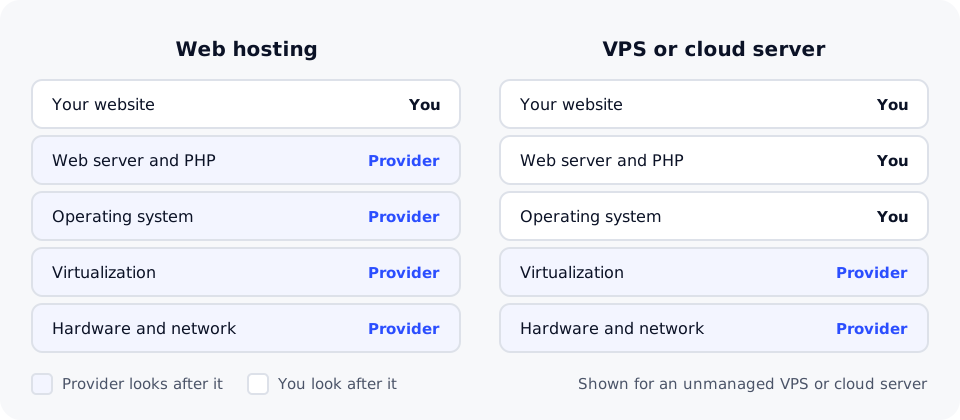
| Who looks after the server | The provider | You | You |
| Root access | No | Yes | Yes |
| Typical tools | Control panel, one-click apps | Command line (SSH), any software you install | Command line (SSH), any software you install |
| Skills needed | None beyond running your site | Linux administration | Linux administration |
| Typical billing | Fixed price per month or year | Fixed price per month or term | Often by the hour, with the option to scale |
| Best for | Websites, blogs, online stores, WordPress | Custom apps and steady workloads | Projects whose needs change, testing, short-lived servers |
Web hosting
With shared web hosting, many websites run on one server that the provider maintains: the operating system, web server software, security updates and backups. You manage your website through a control panel and can install common apps such as WordPress in a few clicks.
Choose web hosting if you want to run a website, not a server. It is the right answer for most sites, including business sites and many online stores.
VPS
A VPS (virtual private server) is a virtual machine on a larger physical server. It gets its own reserved share of processor power (vCPU), memory and storage, and its own operating system with root access.
Choose a VPS if you need software or settings that shared hosting does not allow, such as a specific database version, a background process that runs all the time, or a custom application stack.
With that control comes responsibility. On an unmanaged VPS you install updates, configure the firewall, set up backups and fix problems yourself, or hire someone who can.
Cloud server
A cloud server is also a virtual machine with root access. The difference is flexibility: you can usually create one in minutes, change its size, take snapshots and remove it when you no longer need it, often paying by the hour.
Choose a cloud server for workloads that change, such as a project that grows quickly, a test environment you only need for a few days, or a setup you want to rebuild often.
Signs you have outgrown web hosting
- Your host's resource limits are often reached, even after caching and tidying your site.
- You need software, versions or background processes your hosting plan does not support.
- You need full control of the server's configuration for security or compliance reasons.
If none of these apply, a larger web hosting plan is usually simpler than moving to a server you have to manage.
Questions to ask before you decide
- Do you, or someone on your team, know how to run and secure a Linux server?
- Does your project need software that runs outside a normal website?
- Will your resource needs stay steady, or change from week to week?
- Who will restore the site if something goes wrong at night?
DomainPilot offers web hosting, WordPress hosting, VPS hosting with a fixed monthly price, and cloud servers billed by the hour. Each page lists the resources and prices of every plan.